- Mailing Lists
- Contributors
- Changing quantities and adding products after confirmation of Purchase orders
Archives
- By thread 1419
-
By date
- August 2019 59
- September 2019 118
- October 2019 165
- November 2019 97
- December 2019 35
- January 2020 58
- February 2020 204
- March 2020 121
- April 2020 172
- May 2020 50
- June 2020 158
- July 2020 85
- August 2020 94
- September 2020 193
- October 2020 277
- November 2020 100
- December 2020 159
- January 2021 38
- February 2021 87
- March 2021 146
- April 2021 73
- May 2021 90
- June 2021 86
- July 2021 123
- August 2021 50
- September 2021 68
- October 2021 66
- November 2021 74
- December 2021 75
- January 2022 98
- February 2022 77
- March 2022 68
- April 2022 31
- May 2022 59
- June 2022 87
- July 2022 141
- August 2022 38
- September 2022 73
- October 2022 152
- November 2022 39
- December 2022 50
- January 2023 93
- February 2023 49
- March 2023 106
- April 2023 47
- May 2023 69
- June 2023 92
- July 2023 64
- August 2023 103
- September 2023 91
- October 2023 101
- November 2023 94
- December 2023 46
- January 2024 75
- February 2024 79
- March 2024 104
- April 2024 63
- May 2024 40
- June 2024 160
- July 2024 80
- August 2024 70
- September 2024 62
- October 2024 121
- November 2024 117
- December 2024 89
- January 2025 59
- February 2025 104
- March 2025 96
- April 2025 107
- May 2025 52
- June 2025 72
- July 2025 60
- August 2025 81
- September 2025 124
- October 2025 63
- November 2025 22
Contributors
 Changing quantities and adding products after confirmation of
Purchase orders
Changing quantities and adding products after confirmation of
Purchase orders
Hi all,
I wonder how, in Odoo 12, handle correctly the change of received quantity and the add of new products, once purchase order has been confirmed.
Here is my context :
- Quantity billed are based on "Delivered Quantity".
- purchase order can be quite big. (> 500 lines).
- After a purchase is confirmed, people receiving goods have to change quantity many time with all the cases possibles :
Case A) received qty > ordered qty
Case B) received qty < ordered qty
Case C) received qty = 0 (out of stock)
Case D) new product received (no ordered).
Typical Case
| Ordered Qty | Received Qty | |
| Product A - Corner Desk Right Sit | 10 | 12 |
| Product B - Storage Box | 20 | 18 |
| Product C - Cabinet with Doors | 30 | 0 |
| Product D - Pedal Bin | 0 | 100 |
Draft Purchase Order
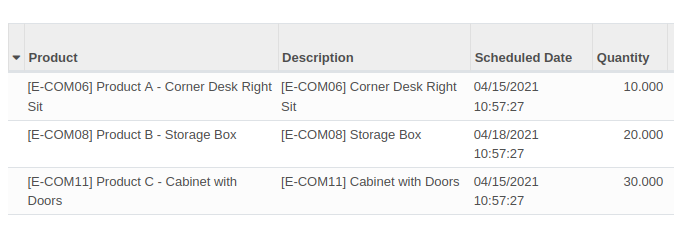
Receiving Stock Picking
For case A, B and C, i can change the received values on the stock picking : the received quantity on the purchase order will be correctly updated / computed.
But if I add a new line (new stock.move), the line is not added on the purchase order, and so, the bill will not contain the correct value.

Purchase order, (once the picking is confirmed)
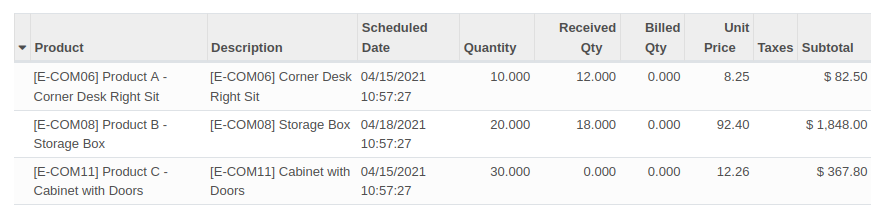
Desired purchase order

The only solution I see for the time being is
- for the case A, B, C : change values on the picking : OK.
- for the case D, add a line on the purchase.order, and then, go to the picking, and then, set the correct received quantity.
That is really not user friendly for end users, and so generates a lot of errors.
- Do you know how to handle the 4 cases in the same screen ?
- Do you know an (OCA) module that could add a purchase.order.line when adding an stock.move on a ready stock.picking ? (not sure it's the good design)
thanks for your help.
GRAP - Service informatique (Groupement Régional Alimentaire de Proximité)
Site Web | FramaSphere | Facebook
3 Grande rue des Feuillants, 69001 Lyon
Standard : (+33) 09.72.32.33.17
3 Grande rue des Feuillants, 69001 Lyon
Standard : (+33) 09.72.32.33.17
Service Informatique : (+33) 09.73.79.64.40
Astreinte Informatique : (+33) 06.81.85.61.43
Member of the OCA (Odoo Community Association)by Sylvain LE GAL - 11:25 - 15 Apr 2021