- Mailing Lists
- Contributors
- elasticsearch configure indexing
Archives
- By thread 1419
-
By date
- August 2019 59
- September 2019 118
- October 2019 165
- November 2019 97
- December 2019 35
- January 2020 58
- February 2020 204
- March 2020 121
- April 2020 172
- May 2020 50
- June 2020 158
- July 2020 85
- August 2020 94
- September 2020 193
- October 2020 277
- November 2020 100
- December 2020 159
- January 2021 38
- February 2021 87
- March 2021 146
- April 2021 73
- May 2021 90
- June 2021 86
- July 2021 123
- August 2021 50
- September 2021 68
- October 2021 66
- November 2021 74
- December 2021 75
- January 2022 98
- February 2022 77
- March 2022 68
- April 2022 31
- May 2022 59
- June 2022 87
- July 2022 141
- August 2022 38
- September 2022 73
- October 2022 152
- November 2022 39
- December 2022 50
- January 2023 93
- February 2023 49
- March 2023 106
- April 2023 47
- May 2023 69
- June 2023 92
- July 2023 64
- August 2023 103
- September 2023 91
- October 2023 101
- November 2023 94
- December 2023 46
- January 2024 75
- February 2024 79
- March 2024 104
- April 2024 63
- May 2024 40
- June 2024 160
- July 2024 80
- August 2024 70
- September 2024 62
- October 2024 121
- November 2024 117
- December 2024 89
- January 2025 59
- February 2025 104
- March 2025 96
- April 2025 107
- May 2025 52
- June 2025 72
- July 2025 60
- August 2025 81
- September 2025 124
- October 2025 63
- November 2025 22
Contributors
[16.0] Reset to Draft button disappear after changed Price on Vendor Bills
Dropping support for python 3.5 and Odoo 11
 elasticsearch configure indexing
While trying to install and run shopinvader project, I got an error that elasticsearch is connected successfully but there is no any document.
I tried to make index by hand outside odoo and it succeeded.
I guess the issue is related to configuration index filed which is in Se Index Config model.
The default value for that field is {} but I am sure it must be changed.
Can someone tell me how to set the value for that field please?
by Mohamed Alkobrosly - 03:42 - 25 Sep 2024
Follow-Ups
-
Re: elasticsearch configure indexing
I have now all the required modules installed successfully, but I guess I have to make some configurations after installing "shopinvader_v2_app_demo" module.
I am not sure if it is related to fast api, as I see it is installed by the demo module.
So I don't know what should be filled in the "Root Path" field, I need help please as I have taken a long journey to set up the dependencies.
I still need the configurations complete without missing any of them.
ThanksOn Wed, Sep 25, 2024 at 6:37 PM Mignon, Laurent <notifications@odoo-community.org> wrote:If you are comfortable with k8s, you can use the shopinvader-infra-demo16 repository (https://github.com/shopinvader/shopinvader-infra-demo16) to quickly get a running env with all the required dependencies.On Wed, Sep 25, 2024 at 5:22 PM mohamed alkobrosly <notifications@odoo-community.org> wrote:Thanks Mignon for helping me.
In fact the channel connector repository was not pulled.
I pulled it and installed sale_channel_search_engine_product module, then the json config index was correct and pushed to elasticsearch.
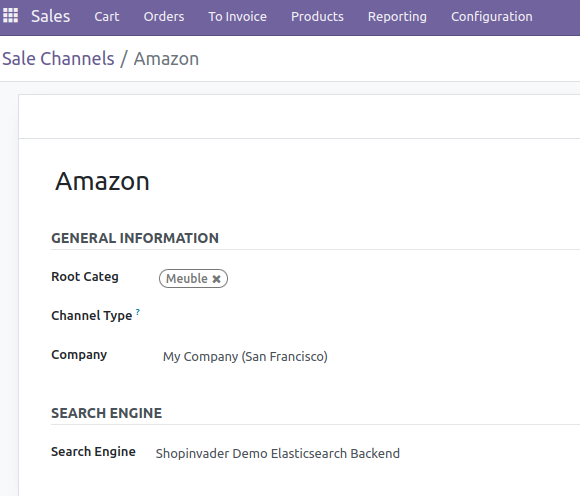
I have to confirm that I linked a channel with search engine, also there is a default demo channel is connected with search engine.
Despite all of this no any products or categories are fetched to search engine.
there were many queued jobs are running successfully but none of them could fetch any products.
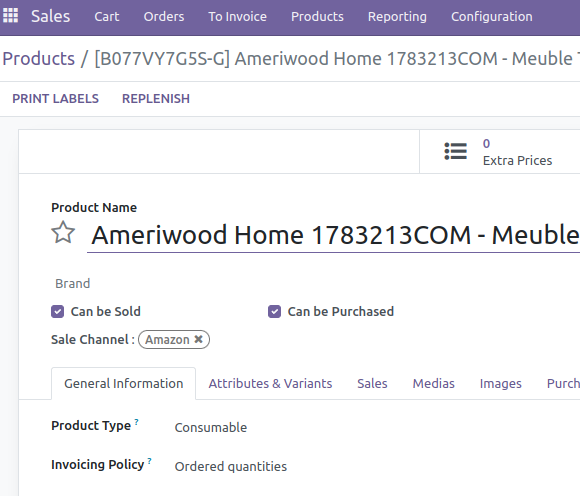
I think there must be a link between channel and products but I don't know really.
The main issue with OCA modules is that there is no description to guide me.
may there there are some modules need to be installed to fetch the products or may be some other configuration.
I am trying this with no templates yet, if it is necessary please tell me where to find nextjs template
I tried to download the images but it didn't succeed
thanks Mignon too
On Wed, Sep 25, 2024, 09:33 Mignon, Laurent <notifications@odoo-community.org> wrote:Hi Mohamed,If you use the shopinvader demo app and the nuxtjs template the following index configuration should work for the product:{"settings": {"analysis": {"char_filter": {"replace": {"type": "mapping", "mappings": ["&=> and "]}}, "filter": {"word_delimiter": {"type": "word_delimiter", "split_on_numerics": false, "split_on_case_change": true, "generate_word_parts": true, "generate_number_parts": true, "catenate_all": true, "preserve_original": true, "catenate_numbers": true}}, "analyzer": {"default": {"type": "custom", "char_filter": ["html_strip", "replace"], "tokenizer": "whitespace", "filter": ["lowercase", "word_delimiter"]}}, "index": {"sort.field": ["main", "id"], "sort.order": ["desc", "asc"]}}}, "mappings": {"properties": {"categories": {"type": "nested", "properties": {"id": {"type": "integer"}, "level": {"type": "integer"}, "name": {"type": "keyword"}, "url_key": {"type": "keyword"}}}, "url_key": {"type": "keyword"}, "variant_attributes": {"properties": {"color": {"type": "text", "fielddata": true}}}, "main": {"type": "boolean"}, "id": {"type": "integer"}, "redirect_url_key": {"type": "keyword"}}}}For the category, you should set:{"settings": {"index": {"sort.field": ["id"], "sort.order": ["asc"]}}, "mappings": {"properties": {"url_key": {"type": "keyword"}, "redirect_url_key": {"type": "keyword"}, "id": {"type": "integer"}}}}In the demo app we use a specific addon to define the products to be exported to elasticsearch: 'sale_channel_search_engine_product'. Therefore on a channel, you must link the channel to a search engine. Once it's done, all the products linked to this sales channel will be exported to elasticsearch.If you plan to come to the OCA days or Odoo XP I'll be happy to help you configure your env to get everything working.Regards,lmiOn Wed, Sep 25, 2024 at 3:42 AM mohamed alkobrosly <notifications@odoo-community.org> wrote:Dear odoo community.
While trying to install and run shopinvader project, I got an error that elasticsearch is connected successfully but there is no any document.
I tried to make index by hand outside odoo and it succeeded.
I guess the issue is related to configuration index filed which is in Se Index Config model.
The default value for that field is {} but I am sure it must be changed.
Can someone tell me how to set the value for that field please?_______________________________________________
Mailing-List: https://odoo-community.org/groups/contributors-15
Post to: mailto:contributors@odoo-community.org
Unsubscribe: https://odoo-community.org/groups?unsubscribe
_______________________________________________
Mailing-List: https://odoo-community.org/groups/contributors-15
Post to: mailto:contributors@odoo-community.org
Unsubscribe: https://odoo-community.org/groups?unsubscribe
_______________________________________________
Mailing-List: https://odoo-community.org/groups/contributors-15
Post to: mailto:contributors@odoo-community.org
Unsubscribe: https://odoo-community.org/groups?unsubscribe
_______________________________________________
Mailing-List: https://odoo-community.org/groups/contributors-15
Post to: mailto:contributors@odoo-community.org
Unsubscribe: https://odoo-community.org/groups?unsubscribe
by Mohamed Alkobrosly - 01:26 - 29 Sep 2024 -
 Re: elasticsearch configure indexing
If you are comfortable with k8s, you can use the shopinvader-infra-demo16 repository (https://github.com/shopinvader/shopinvader-infra-demo16) to quickly get a running env with all the required dependencies.On Wed, Sep 25, 2024 at 5:22 PM mohamed alkobrosly <notifications@odoo-community.org> wrote:
Re: elasticsearch configure indexing
If you are comfortable with k8s, you can use the shopinvader-infra-demo16 repository (https://github.com/shopinvader/shopinvader-infra-demo16) to quickly get a running env with all the required dependencies.On Wed, Sep 25, 2024 at 5:22 PM mohamed alkobrosly <notifications@odoo-community.org> wrote:Thanks Mignon for helping me.
In fact the channel connector repository was not pulled.
I pulled it and installed sale_channel_search_engine_product module, then the json config index was correct and pushed to elasticsearch.
I have to confirm that I linked a channel with search engine, also there is a default demo channel is connected with search engine.
Despite all of this no any products or categories are fetched to search engine.
there were many queued jobs are running successfully but none of them could fetch any products.
I think there must be a link between channel and products but I don't know really.
The main issue with OCA modules is that there is no description to guide me.
may there there are some modules need to be installed to fetch the products or may be some other configuration.
I am trying this with no templates yet, if it is necessary please tell me where to find nextjs template
I tried to download the images but it didn't succeed
thanks Mignon too
On Wed, Sep 25, 2024, 09:33 Mignon, Laurent <notifications@odoo-community.org> wrote:Hi Mohamed,If you use the shopinvader demo app and the nuxtjs template the following index configuration should work for the product:{"settings": {"analysis": {"char_filter": {"replace": {"type": "mapping", "mappings": ["&=> and "]}}, "filter": {"word_delimiter": {"type": "word_delimiter", "split_on_numerics": false, "split_on_case_change": true, "generate_word_parts": true, "generate_number_parts": true, "catenate_all": true, "preserve_original": true, "catenate_numbers": true}}, "analyzer": {"default": {"type": "custom", "char_filter": ["html_strip", "replace"], "tokenizer": "whitespace", "filter": ["lowercase", "word_delimiter"]}}, "index": {"sort.field": ["main", "id"], "sort.order": ["desc", "asc"]}}}, "mappings": {"properties": {"categories": {"type": "nested", "properties": {"id": {"type": "integer"}, "level": {"type": "integer"}, "name": {"type": "keyword"}, "url_key": {"type": "keyword"}}}, "url_key": {"type": "keyword"}, "variant_attributes": {"properties": {"color": {"type": "text", "fielddata": true}}}, "main": {"type": "boolean"}, "id": {"type": "integer"}, "redirect_url_key": {"type": "keyword"}}}}For the category, you should set:{"settings": {"index": {"sort.field": ["id"], "sort.order": ["asc"]}}, "mappings": {"properties": {"url_key": {"type": "keyword"}, "redirect_url_key": {"type": "keyword"}, "id": {"type": "integer"}}}}In the demo app we use a specific addon to define the products to be exported to elasticsearch: 'sale_channel_search_engine_product'. Therefore on a channel, you must link the channel to a search engine. Once it's done, all the products linked to this sales channel will be exported to elasticsearch.If you plan to come to the OCA days or Odoo XP I'll be happy to help you configure your env to get everything working.Regards,lmiOn Wed, Sep 25, 2024 at 3:42 AM mohamed alkobrosly <notifications@odoo-community.org> wrote:Dear odoo community.
While trying to install and run shopinvader project, I got an error that elasticsearch is connected successfully but there is no any document.
I tried to make index by hand outside odoo and it succeeded.
I guess the issue is related to configuration index filed which is in Se Index Config model.
The default value for that field is {} but I am sure it must be changed.
Can someone tell me how to set the value for that field please?_______________________________________________
Mailing-List: https://odoo-community.org/groups/contributors-15
Post to: mailto:contributors@odoo-community.org
Unsubscribe: https://odoo-community.org/groups?unsubscribe
_______________________________________________
Mailing-List: https://odoo-community.org/groups/contributors-15
Post to: mailto:contributors@odoo-community.org
Unsubscribe: https://odoo-community.org/groups?unsubscribe
_______________________________________________
Mailing-List: https://odoo-community.org/groups/contributors-15
Post to: mailto:contributors@odoo-community.org
Unsubscribe: https://odoo-community.org/groups?unsubscribe
by Laurent Mignon - 05:35 - 25 Sep 2024 -
Re: elasticsearch configure indexing
Thanks Mignon for helping me.
In fact the channel connector repository was not pulled.
I pulled it and installed sale_channel_search_engine_product module, then the json config index was correct and pushed to elasticsearch.
I have to confirm that I linked a channel with search engine, also there is a default demo channel is connected with search engine.
Despite all of this no any products or categories are fetched to search engine.
there were many queued jobs are running successfully but none of them could fetch any products.
I think there must be a link between channel and products but I don't know really.
The main issue with OCA modules is that there is no description to guide me.
may there there are some modules need to be installed to fetch the products or may be some other configuration.
I am trying this with no templates yet, if it is necessary please tell me where to find nextjs template
I tried to download the images but it didn't succeed
thanks Mignon too
On Wed, Sep 25, 2024, 09:33 Mignon, Laurent <notifications@odoo-community.org> wrote:Hi Mohamed,If you use the shopinvader demo app and the nuxtjs template the following index configuration should work for the product:{"settings": {"analysis": {"char_filter": {"replace": {"type": "mapping", "mappings": ["&=> and "]}}, "filter": {"word_delimiter": {"type": "word_delimiter", "split_on_numerics": false, "split_on_case_change": true, "generate_word_parts": true, "generate_number_parts": true, "catenate_all": true, "preserve_original": true, "catenate_numbers": true}}, "analyzer": {"default": {"type": "custom", "char_filter": ["html_strip", "replace"], "tokenizer": "whitespace", "filter": ["lowercase", "word_delimiter"]}}, "index": {"sort.field": ["main", "id"], "sort.order": ["desc", "asc"]}}}, "mappings": {"properties": {"categories": {"type": "nested", "properties": {"id": {"type": "integer"}, "level": {"type": "integer"}, "name": {"type": "keyword"}, "url_key": {"type": "keyword"}}}, "url_key": {"type": "keyword"}, "variant_attributes": {"properties": {"color": {"type": "text", "fielddata": true}}}, "main": {"type": "boolean"}, "id": {"type": "integer"}, "redirect_url_key": {"type": "keyword"}}}}For the category, you should set:{"settings": {"index": {"sort.field": ["id"], "sort.order": ["asc"]}}, "mappings": {"properties": {"url_key": {"type": "keyword"}, "redirect_url_key": {"type": "keyword"}, "id": {"type": "integer"}}}}In the demo app we use a specific addon to define the products to be exported to elasticsearch: 'sale_channel_search_engine_product'. Therefore on a channel, you must link the channel to a search engine. Once it's done, all the products linked to this sales channel will be exported to elasticsearch.If you plan to come to the OCA days or Odoo XP I'll be happy to help you configure your env to get everything working.Regards,lmiOn Wed, Sep 25, 2024 at 3:42 AM mohamed alkobrosly <notifications@odoo-community.org> wrote:Dear odoo community.
While trying to install and run shopinvader project, I got an error that elasticsearch is connected successfully but there is no any document.
I tried to make index by hand outside odoo and it succeeded.
I guess the issue is related to configuration index filed which is in Se Index Config model.
The default value for that field is {} but I am sure it must be changed.
Can someone tell me how to set the value for that field please?_______________________________________________
Mailing-List: https://odoo-community.org/groups/contributors-15
Post to: mailto:contributors@odoo-community.org
Unsubscribe: https://odoo-community.org/groups?unsubscribe
_______________________________________________
Mailing-List: https://odoo-community.org/groups/contributors-15
Post to: mailto:contributors@odoo-community.org
Unsubscribe: https://odoo-community.org/groups?unsubscribe
by Mohamed Alkobrosly - 05:21 - 25 Sep 2024 -
Re: elasticsearch configure indexing
Hi Mohamed,If you use the shopinvader demo app and the nuxtjs template the following index configuration should work for the product:{"settings": {"analysis": {"char_filter": {"replace": {"type": "mapping", "mappings": ["&=> and "]}}, "filter": {"word_delimiter": {"type": "word_delimiter", "split_on_numerics": false, "split_on_case_change": true, "generate_word_parts": true, "generate_number_parts": true, "catenate_all": true, "preserve_original": true, "catenate_numbers": true}}, "analyzer": {"default": {"type": "custom", "char_filter": ["html_strip", "replace"], "tokenizer": "whitespace", "filter": ["lowercase", "word_delimiter"]}}, "index": {"sort.field": ["main", "id"], "sort.order": ["desc", "asc"]}}}, "mappings": {"properties": {"categories": {"type": "nested", "properties": {"id": {"type": "integer"}, "level": {"type": "integer"}, "name": {"type": "keyword"}, "url_key": {"type": "keyword"}}}, "url_key": {"type": "keyword"}, "variant_attributes": {"properties": {"color": {"type": "text", "fielddata": true}}}, "main": {"type": "boolean"}, "id": {"type": "integer"}, "redirect_url_key": {"type": "keyword"}}}}For the category, you should set:{"settings": {"index": {"sort.field": ["id"], "sort.order": ["asc"]}}, "mappings": {"properties": {"url_key": {"type": "keyword"}, "redirect_url_key": {"type": "keyword"}, "id": {"type": "integer"}}}}In the demo app we use a specific addon to define the products to be exported to elasticsearch: 'sale_channel_search_engine_product'. Therefore on a channel, you must link the channel to a search engine. Once it's done, all the products linked to this sales channel will be exported to elasticsearch.If you plan to come to the OCA days or Odoo XP I'll be happy to help you configure your env to get everything working.Regards,lmiOn Wed, Sep 25, 2024 at 3:42 AM mohamed alkobrosly <notifications@odoo-community.org> wrote:Dear odoo community.
While trying to install and run shopinvader project, I got an error that elasticsearch is connected successfully but there is no any document.
I tried to make index by hand outside odoo and it succeeded.
I guess the issue is related to configuration index filed which is in Se Index Config model.
The default value for that field is {} but I am sure it must be changed.
Can someone tell me how to set the value for that field please?_______________________________________________
Mailing-List: https://odoo-community.org/groups/contributors-15
Post to: mailto:contributors@odoo-community.org
Unsubscribe: https://odoo-community.org/groups?unsubscribe
by Laurent Mignon - 08:30 - 25 Sep 2024