- Mailing Lists
- Contributors
- Re: Odoo 12.0 Website rendering issues
Archives
- By thread 1419
-
By date
- August 2019 59
- September 2019 118
- October 2019 165
- November 2019 97
- December 2019 35
- January 2020 58
- February 2020 204
- March 2020 121
- April 2020 172
- May 2020 50
- June 2020 158
- July 2020 85
- August 2020 94
- September 2020 193
- October 2020 277
- November 2020 100
- December 2020 159
- January 2021 38
- February 2021 87
- March 2021 146
- April 2021 73
- May 2021 90
- June 2021 86
- July 2021 123
- August 2021 50
- September 2021 68
- October 2021 66
- November 2021 74
- December 2021 75
- January 2022 98
- February 2022 77
- March 2022 68
- April 2022 31
- May 2022 59
- June 2022 87
- July 2022 141
- August 2022 38
- September 2022 73
- October 2022 152
- November 2022 39
- December 2022 50
- January 2023 93
- February 2023 49
- March 2023 106
- April 2023 47
- May 2023 69
- June 2023 92
- July 2023 64
- August 2023 103
- September 2023 91
- October 2023 101
- November 2023 94
- December 2023 46
- January 2024 75
- February 2024 79
- March 2024 104
- April 2024 63
- May 2024 40
- June 2024 160
- July 2024 80
- August 2024 70
- September 2024 62
- October 2024 121
- November 2024 117
- December 2024 89
- January 2025 59
- February 2025 104
- March 2025 96
- April 2025 107
- May 2025 52
- June 2025 72
- July 2025 60
- August 2025 81
- September 2025 124
- October 2025 63
- November 2025 22
Contributors
 Re: Odoo 12.0 Website rendering issues
Ok found the culprit:
website_lazy_load_image
When installed, the <!DOCTYPE html> is no more set as a header.
Removing the module fixes the issue.
Cordialement,
Yann Papouin.
Yann Papouin.
Le mer. 2 déc. 2020 à 17:02, Yann Papouin <y.papouin@dec-industrie.com> a écrit :
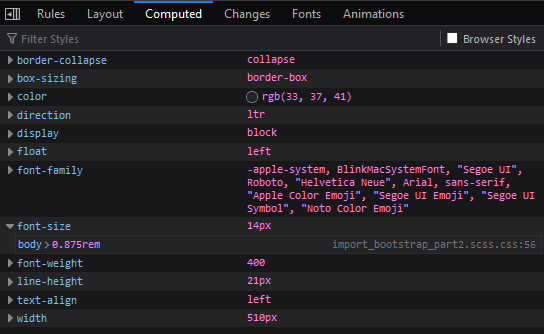
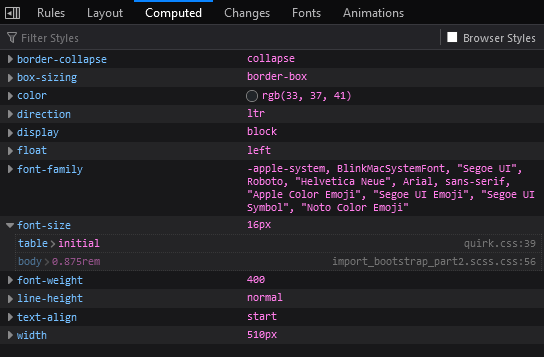
Hi,I'm currently scratching my head to find out why our website have a different rendering when viewed as an anonymous user versus a logged user.When hitting the first table node as a logged user:An the same node as anonymousThe quirk.css is an old firefox builtin css to fix some rendering issues but I don't understand why it is spawning there, overriding Odoo's bootstrap css.Note that I can observe the same issue on Chrome.I found on Google that putting this meta should disable quirk mode, but this meta already exists in both renderings:Any ideas ?<meta http-equiv="X-UA-Compatible" content="IE=edge,chrome=1" />Cordialement,
Yann Papouin.
by Yann Papouin - 05:26 - 2 Dec 2020
Reference
-
Odoo 12.0 Website rendering issues
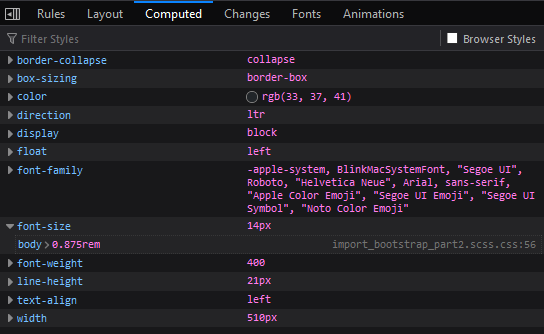
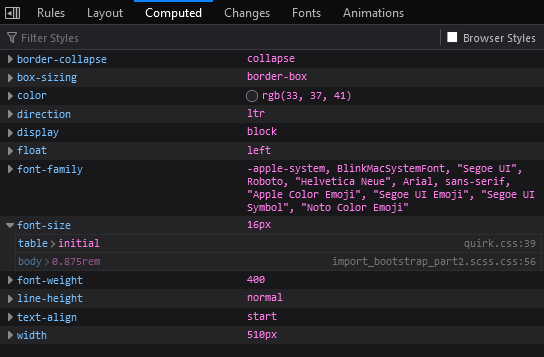
Hi,I'm currently scratching my head to find out why our website have a different rendering when viewed as an anonymous user versus a logged user.When hitting the first table node as a logged user:An the same node as anonymousThe quirk.css is an old firefox builtin css to fix some rendering issues but I don't understand why it is spawning there, overriding Odoo's bootstrap css.Note that I can observe the same issue on Chrome.I found on Google that putting this meta should disable quirk mode, but this meta already exists in both renderings:
Any ideas ?<meta http-equiv="X-UA-Compatible" content="IE=edge,chrome=1" />Cordialement,
Yann Papouin.
by Yann Papouin - 05:06 - 2 Dec 2020-
 Re: Odoo 12.0 Website rendering issues
Hello,FTR it has been reported a while ago herehttps://github.com/OCA/website/issues/718 and there's a fix here https://github.com/OCA/website/pull/719 which is stuck on tests.Bests,On Wed, Dec 2, 2020 at 5:27 PM Yann Papouin <y.papouin@dec-industrie.com> wrote:Ok found the culprit: website_lazy_load_imageWhen installed, the <!DOCTYPE html> is no more set as a header.Removing the module fixes the issue.Cordialement,
Re: Odoo 12.0 Website rendering issues
Hello,FTR it has been reported a while ago herehttps://github.com/OCA/website/issues/718 and there's a fix here https://github.com/OCA/website/pull/719 which is stuck on tests.Bests,On Wed, Dec 2, 2020 at 5:27 PM Yann Papouin <y.papouin@dec-industrie.com> wrote:Ok found the culprit: website_lazy_load_imageWhen installed, the <!DOCTYPE html> is no more set as a header.Removing the module fixes the issue.Cordialement,
Yann Papouin.Le mer. 2 déc. 2020 à 17:02, Yann Papouin <y.papouin@dec-industrie.com> a écrit :Hi,I'm currently scratching my head to find out why our website have a different rendering when viewed as an anonymous user versus a logged user.When hitting the first table node as a logged user:An the same node as anonymousThe quirk.css is an old firefox builtin css to fix some rendering issues but I don't understand why it is spawning there, overriding Odoo's bootstrap css.Note that I can observe the same issue on Chrome.I found on Google that putting this meta should disable quirk mode, but this meta already exists in both renderings:
Any ideas ?<meta http-equiv="X-UA-Compatible" content="IE=edge,chrome=1" />Cordialement,
Yann Papouin._______________________________________________
Mailing-List: https://odoo-community.org/groups/contributors-15
Post to: mailto:contributors@odoo-community.org
Unsubscribe: https://odoo-community.org/groups?unsubscribe
--Simone OrsiFull stack Python web developer, Odoo specialist, Odoo Community Board Member, Freelance in love with open source.
by Simone Orsi - 08:11 - 3 Dec 2020 -
Re: Odoo 12.0 Website rendering issues
Ok found the culprit: website_lazy_load_imageWhen installed, the <!DOCTYPE html> is no more set as a header.Removing the module fixes the issue.Cordialement,
Yann Papouin.Le mer. 2 déc. 2020 à 17:02, Yann Papouin <y.papouin@dec-industrie.com> a écrit :Hi,I'm currently scratching my head to find out why our website have a different rendering when viewed as an anonymous user versus a logged user.When hitting the first table node as a logged user:An the same node as anonymousThe quirk.css is an old firefox builtin css to fix some rendering issues but I don't understand why it is spawning there, overriding Odoo's bootstrap css.Note that I can observe the same issue on Chrome.I found on Google that putting this meta should disable quirk mode, but this meta already exists in both renderings:
Any ideas ?<meta http-equiv="X-UA-Compatible" content="IE=edge,chrome=1" />Cordialement,
Yann Papouin.
by Yann Papouin - 05:26 - 2 Dec 2020
-