- Mailing Lists
- Contributors
- User friendly interface for managing translations from user point of view
Archives
- By thread 1419
-
By date
- August 2019 59
- September 2019 118
- October 2019 165
- November 2019 97
- December 2019 35
- January 2020 58
- February 2020 204
- March 2020 121
- April 2020 172
- May 2020 50
- June 2020 158
- July 2020 85
- August 2020 94
- September 2020 193
- October 2020 277
- November 2020 100
- December 2020 159
- January 2021 38
- February 2021 87
- March 2021 146
- April 2021 73
- May 2021 90
- June 2021 86
- July 2021 123
- August 2021 50
- September 2021 68
- October 2021 66
- November 2021 74
- December 2021 75
- January 2022 98
- February 2022 77
- March 2022 68
- April 2022 31
- May 2022 59
- June 2022 87
- July 2022 141
- August 2022 38
- September 2022 73
- October 2022 152
- November 2022 39
- December 2022 50
- January 2023 93
- February 2023 49
- March 2023 106
- April 2023 47
- May 2023 69
- June 2023 92
- July 2023 64
- August 2023 103
- September 2023 91
- October 2023 101
- November 2023 94
- December 2023 46
- January 2024 75
- February 2024 79
- March 2024 104
- April 2024 63
- May 2024 40
- June 2024 160
- July 2024 80
- August 2024 70
- September 2024 62
- October 2024 121
- November 2024 117
- December 2024 89
- January 2025 59
- February 2025 104
- March 2025 96
- April 2025 107
- May 2025 52
- June 2025 72
- July 2025 60
- August 2025 81
- September 2025 124
- October 2025 63
- November 2025 22
Contributors
User friendly interface for managing translations from user point of view
Hello,

we have some description fields in our custom models we need to get
translated.
I know everything about the standard odoo mechanism, but I’m thinking
about something more maintainable by end users.

So what I’m looking for is a more user friendly interface for users to
access the stored translations for a field.
More user friendly than switching their own language preference or going
into edit mode and press this little globe button that leads to
ir.translation.

Do you know something like that?
Maybe has anybody already written widgets for this?
I could imagine something similiar like this globe button, but also
vissible in read mode, opening a popup for changing the language only
for that field for a moment, or something like that.

Any hinds?

Thanks, regards, Peter
by Pete Hahn - 03:16 - 21 Sep 2020
Follow-Ups
-
Re: User friendly interface for managing translations from user point of view
I think there is a minor bug.
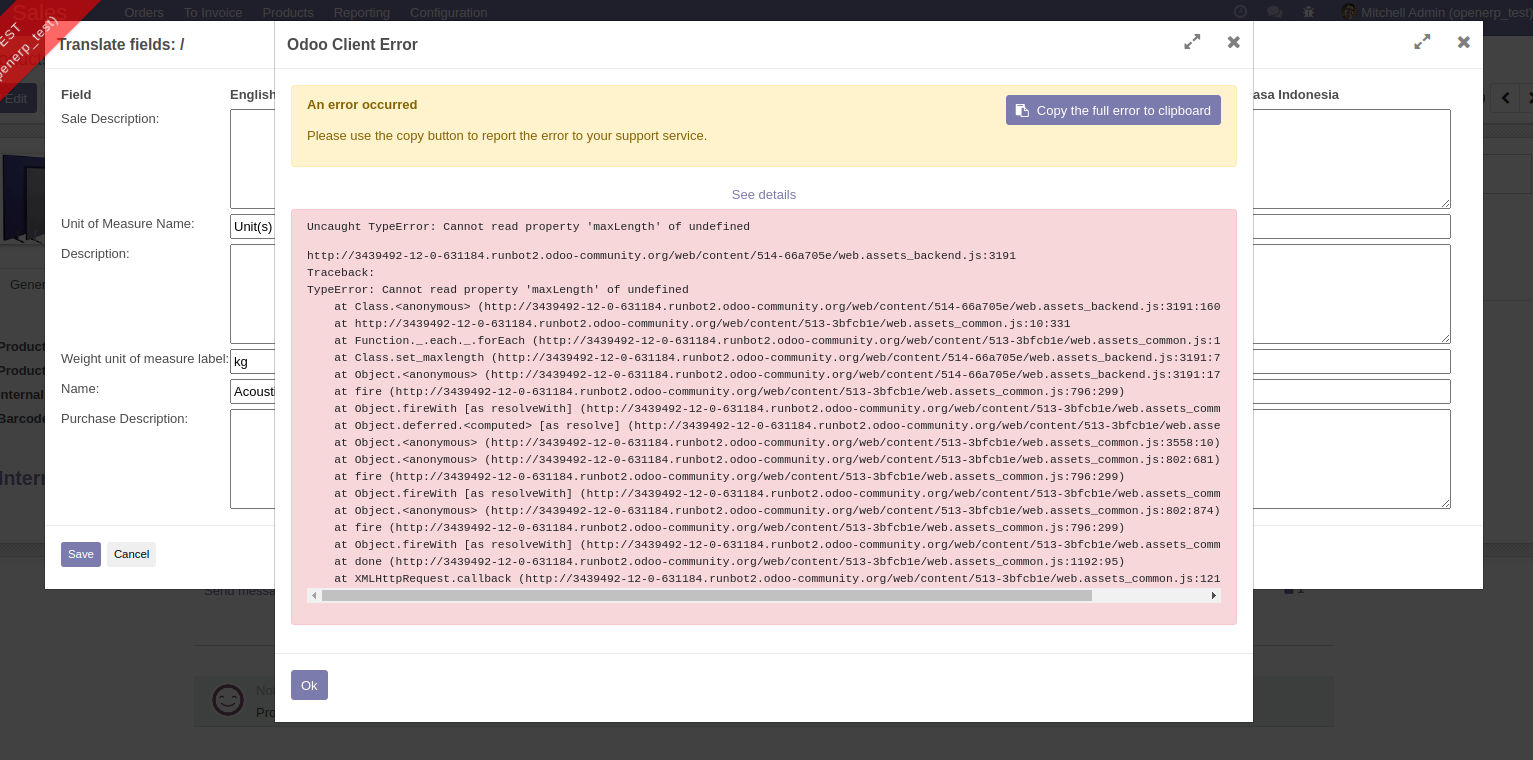
I tried it in odoo v12 and got some error about maxLength.
However since I only use it for a form with only translatable fields of
type Text, the error is gone, so I assume there is something wrong for
fields of type Char, but I didn’t investigate further though.

Am 22.09.20 um 10:27 schrieb Radovan Skolnik:

> Interesting but whenever I try that on runbot I end up with exception...
by Pete Hahn - 11:16 - 22 Sep 2020 -
 Re: User friendly interface for managing translations from user point of view
Hi!
Interesting but whenever I try that on runbot I end up with exception...
Best regards
Radovan
On pondelok 21. septembra 2020 15:52:28 CEST Christian Zöllner wrote:
> Hi Peter, what about
> https://github.com/OCA/web/tree/12.0/web_translate_dialog [1] ? Best
> Regards Christian Von: *"Peter Hahn" <peter.hahn@initos.com> An: *"Odoo
> Community Association, (OCA) Contributors"
> <contributors@odoo-community.org> Gesendet: *Montag, 21. September 2020
> 15:17:33 Betreff: *User friendly interface for managing translations from
> user point of view Hello, we have some description fields in our custom
> models we need to get translated.
> I know everything about the standard odoo mechanism, but I’m thinking
> about something more maintainable by end users.
> So what I’m looking for is a more user friendly interface for users to
> access the stored translations for a field.
> More user friendly than switching their own language preference or going
> into edit mode and press this little globe button that leads to
> ir.translation.
> Do you know something like that?
> Maybe has anybody already written widgets for this?
> I could imagine something similiar like this globe button, but also
> vissible in read mode, opening a popup for changing the language only
> for that field for a moment, or something like that.
> Any hinds?
> Thanks, regards, Peter
>
> _______________________________________________ Mailing-List:
> https://odoo-community.org/groups/contributors-15 [2] Post to:
> mailto:contributors@odoo-community.org Unsubscribe:
> https://odoo-community.org/groups?unsubscribe [3] -- Christian Zöllner
> E-Mail: c.zoellner@intero-technologies.de Intero Technologies GmbH
> Heinrich-Heine-Ring 76 D - 18435 Stralsund Tel: +49 (0) 3831 – 44 55 7 - 0
> Fax: +49 (0) 3831 – 44 55 7 - 79 Internet: www.intero-technologies.de
> Intero Technologies GmbH • Firmensitz: Heinrich-Heine-Ring 76, 18435
> Stralsund , Deutschland • Registergericht: Amtsgericht Stralsund, HRB 7076
> • Geschäftsführer: Frank Löffler, Lars Lifson • USt-Ident.Nr. DE 251251697
> This eMail and its content is dedicated to the intended recipient only. If
> you have received it in error please contact the sender immediately by fax
> or return eMail. Please then delete the eMail and any copies of it.
> _______________________________________________
> Mailing-List: https://odoo-community.org/groups/contributors-15 [4]
> Post to: mailto:contributors@odoo-community.org
> Unsubscribe: https://odoo-community.org/groups?unsubscribe [5]
>
>
>
> [1] https://github.com/OCA/web/tree/12.0/web_translate_dialog
> [2] https://odoo-community.org/groups/contributors-15
> [3] https://odoo-community.org/groups?unsubscribe
> [4] https://odoo-community.org/groups/contributors-15
> [5] https://odoo-community.org/groups?unsubscribe
by Radovan Skolnik - 10:25 - 22 Sep 2020 -
RE: User friendly interface for managing translations from user point of view
Dear,
Would be interested too.
With kind regards,
Van Hirtum Johan
Van: Peter Hahn [mailto:peter.hahn@initos.com]
Verzonden: maandag 21 september 2020 15:18
Aan: Contributors
Onderwerp: User friendly interface for managing translations from user point of viewHello,
we have some description fields in our custom models we need to get
translated.
I know everything about the standard odoo mechanism, but I’m thinking
about something more maintainable by end users.
So what I’m looking for is a more user friendly interface for users to
access the stored translations for a field.
More user friendly than switching their own language preference or going
into edit mode and press this little globe button that leads to
ir.translation.
Do you know something like that?
Maybe has anybody already written widgets for this?
I could imagine something similiar like this globe button, but also
vissible in read mode, opening a popup for changing the language only
for that field for a moment, or something like that.
Any hinds?
Thanks, regards, Peter
_______________________________________________
Mailing-List: https://odoo-community.org/groups/contributors-15
Post to: mailto:contributors@odoo-community.org
Unsubscribe: https://odoo-community.org/groups?unsubscribe
by johan - 05:01 - 21 Sep 2020 -
 Re: User friendly interface for managing translations from user
point of view
Re: User friendly interface for managing translations from user
point of view
Hi Christian,

well i wouldn't say its perfectly easy to use but a way better than the
standard function.

@Peter: If that woul be integrated with automated translation that'll
be a good improvement i guess.

Best Frederik

Am Montag, den 21.09.2020, 13:52 +0000 schrieb Christian Zöllner:

> Hi Peter,

>

> what about https://github.com/OCA/web/tree/12.0/web_translate_dialog

> ?

>

> Best Regards

> Christian

>

> Von: "Peter Hahn" <peter.hahn@initos.com>

> An: "Odoo Community Association, (OCA) Contributors" <

> contributors@odoo-community.org>

> Gesendet: Montag, 21. September 2020 15:17:33

> Betreff: User friendly interface for managing translations from user

> point of view

>

> Hello,

>

> we have some description fields in our custom models we need to get

> translated.

> I know everything about the standard odoo mechanism, but I’m thinking

> about something more maintainable by end users.

>

> So what I’m looking for is a more user friendly interface for users

> to

> access the stored translations for a field.

> More user friendly than switching their own language preference or

> going

> into edit mode and press this little globe button that leads to

> ir.translation.

>

> Do you know something like that?

> Maybe has anybody already written widgets for this?

> I could imagine something similiar like this globe button, but also

> vissible in read mode, opening a popup for changing the language only

> for that field for a moment, or something like that.

>

> Any hinds?

>

> Thanks, regards, Peter

> _______________________________________________

> Mailing-List: https://odoo-community.org/groups/contributors-15

> Post to: mailto:contributors@odoo-community.org

> Unsubscribe: https://odoo-community.org/groups?unsubscribe

>

>

> --

> Christian Zöllner

> E-Mail: c.zoellner@intero-technologies.de

>

> Intero Technologies GmbH

> Heinrich-Heine-Ring 76

> D - 18435 Stralsund

> Tel: +49 (0) 3831 – 44 55 7 - 0

> Fax: +49 (0) 3831 – 44 55 7 - 79

>

> Internet: www.intero-technologies.de

>

> Intero Technologies GmbH • Firmensitz: Heinrich-Heine-Ring 76, 18435

> Stralsund , Deutschland • Registergericht: Amtsgericht Stralsund, HRB

> 7076 • Geschäftsführer: Frank Löffler, Lars Lifson • USt-Ident.Nr. DE

> 251251697

>

> This eMail and its content is dedicated to the intended recipient

> only. If you have received it in error please contact the sender

> immediately by fax or return eMail. Please then delete the eMail and

> any copies of it.

> _______________________________________________

> Mailing-List: https://odoo-community.org/groups/contributors-15

> Post to: mailto:contributors@odoo-community.org

> Unsubscribe: https://odoo-community.org/groups?unsubscribe

--
Dr.-Ing. Frederik Kramer
Geschäftsführer

initOS GmbH
An der Eisenbahn 1
21224 Rosengarten

Phone:  +49 4105 56156-12
Fax:    +49 4105 56156-10
Mobil:  +49 179 3901819

Email: frederik.kramer@initos.com
Web:   www.initos.com

Geschäftsführung:
Dr.-Ing. Frederik Kramer & Dipl.-Ing. (FH) Torsten Francke

Sitz der Gesellschaft: Rosengarten – Klecken
Amtsgericht Tostedt, HRB 205226
Steuer-Nr: 15/200/53247
USt-IdNr.: DE815580155
by Frederik Kramer - 04:20 - 21 Sep 2020 -
 Re: User friendly interface for managing translations from user
point of view
Hi Peter,Best RegardsChristianVon: "Peter Hahn" <peter.hahn@initos.com>
Re: User friendly interface for managing translations from user
point of view
Hi Peter,Best RegardsChristianVon: "Peter Hahn" <peter.hahn@initos.com>
An: "Odoo Community Association, (OCA) Contributors" <contributors@odoo-community.org>
Gesendet: Montag, 21. September 2020 15:17:33
Betreff: User friendly interface for managing translations from user point of viewHello, we have some description fields in our custom models we need to get translated. I know everything about the standard odoo mechanism, but I’m thinking about something more maintainable by end users. So what I’m looking for is a more user friendly interface for users to access the stored translations for a field. More user friendly than switching their own language preference or going into edit mode and press this little globe button that leads to ir.translation. Do you know something like that? Maybe has anybody already written widgets for this? I could imagine something similiar like this globe button, but also vissible in read mode, opening a popup for changing the language only for that field for a moment, or something like that. Any hinds? Thanks, regards, Peter
_______________________________________________
Mailing-List: https://odoo-community.org/groups/contributors-15
Post to: mailto:contributors@odoo-community.org
Unsubscribe: https://odoo-community.org/groups?unsubscribe
--Christian Zöllner
E-Mail: c.zoellner@intero-technologies.de
Intero Technologies GmbH
Heinrich-Heine-Ring 76
D - 18435 Stralsund
Tel: +49 (0) 3831 – 44 55 7 - 0
Fax: +49 (0) 3831 – 44 55 7 - 79
Internet: www.intero-technologies.de
Intero Technologies GmbH • Firmensitz: Heinrich-Heine-Ring 76, 18435 Stralsund , Deutschland • Registergericht: Amtsgericht Stralsund, HRB 7076 • Geschäftsführer: Frank Löffler, Lars Lifson • USt-Ident.Nr. DE 251251697
This eMail and its content is dedicated to the intended recipient only. If you have received it in error please contact the sender immediately by fax or return eMail. Please then delete the eMail and any copies of it.
by Christian Zöllner - 03:51 - 21 Sep 2020